
I’ve been working with both Vista and Windows Server 2008 for quite a while now, but I still manage to fall foul of User Account Control, especially when working from the command prompt. As you will no doubt be aware, there are certain tasks that need elevated privileges and these require you to open the command window as Administrator (you do this by right-clicking the command prompt icon and selecting “Run As Administrator”).
If you try to run tasks that require elevated privilege in a normal (i.e. unprivileged) command window, one of two things will happen. Either the command that you are attempting to run will tell you that it requires elevated privileges, or it will fail with an (often obscure and unhelpful) error message. Here’s an example.
The other day I wanted to run the Active Directory Schema MMC snap-in (schmmgmt.msc) on a DC. To access the snap-in you first need to register a dll named schmmgmt.dll. The command to do this is:
regsvr32 schmmgmt.dll
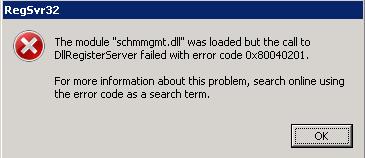
On a Windows Server 2008 machine this activity requires elevated privileges, so you need to run the command as Administrator. If you don’t, you will see the error below.
The module “schmmgmt.dll” was loaded but the call to DllRegisterServer failed with the error code 0x80040201
It took me a good few minutes to work out what I had done wrong. Doh! Hopefully I’ll eventually get the hang of User Account Control.
Thank you so much!…i cant thank you enough
Thank you so much!…i cant thank you enough
Thank You!! i was stuck on this…. 🙂
Thank You!! i was stuck on this…. 🙂
I just want thank you as well, i went as far as re-installing the OS thinking i had done something wrong.
I just want thank you as well, i went as far as re-installing the OS thinking i had done something wrong.
Good tip! Thanks, I too was stuck with this.
Good tip! Thanks, I too was stuck with this.
very very thakyou…
very very thakyou…
Dude I was stuck in the samething,by saying this you saved my day.thanks a lot mate
Dude I was stuck in the samething,by saying this you saved my day.thanks a lot mate
Thanks a million